
Simple Audio Recording Tool for WAV Files
Overview
The software is designed for users who need a straightforward way to record audio and save it in WAV format. It serves as a minimalistic tool for capturing voice notes, short audio clips, or basic sound recordings without the complexity of full-featured audio editors. The application is intended for casual users, students, educators, and professionals who require quick, reliable audio capture with minimal setup.
Based on the Web Audio API, the software mirrors the functionality of the web-based AudioRecorder demo, making it accessible to users familiar with that interface. It supports both Windows and Mac platforms, offering cross-platform consistency. The tool does not include advanced editing features such as noise reduction, effects, or multi-track mixing, focusing instead on core recording and file output.
Real-world usage scenarios include recording lecture snippets, interview audio, or voice memos for personal or educational use. The absence of a user interface beyond essential controls suggests it is best suited for users who prioritize simplicity and immediate functionality. The developer did not provide additional details about the company or background.
Key Features & Capabilities
- Audio Recording – Enables real-time recording of audio input from a microphone or system source.
- WAV File Export – Saves recorded audio directly as uncompressed WAV files, ensuring compatibility with most audio software and platforms.
- Web Audio API Integration – Built using modern web technologies, allowing efficient audio processing and low-latency performance.
- Minimal Interface – Provides only essential controls such as record, stop, and playback, reducing distractions and simplifying the user experience.
- Platform Compatibility – Runs on both Windows and Mac systems, supporting a broad range of users across operating systems.
These features support basic audio capture workflows. For example, a student can record a professor’s lecture and save it as a WAV file for later review. A content creator might use it to capture voiceover ideas before transferring them to a more advanced editor. The tool does not include real-time effects or file compression, making it ideal for raw, high-fidelity recordings.
User Interface, Workflow & Performance
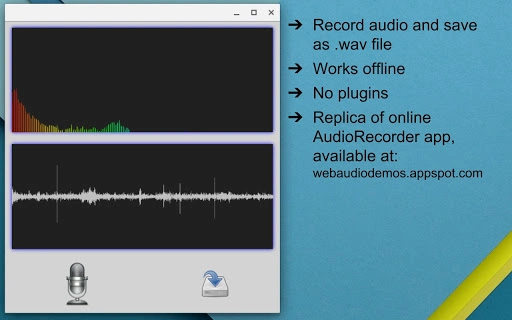
The user interface is intentionally minimal, featuring only essential controls: a record button, stop button, and playback indicator. Navigation is direct and intuitive, with no menus or complex settings. The workflow follows a simple sequence: start recording, capture audio, stop, and save as WAV.
Given the application’s lightweight nature and focus on core functionality, it is expected to operate smoothly on modern systems. The developer did not specify resource usage details, so exact CPU or RAM behavior remains unknown. Performance observations are based on general software behavior patterns for similar tools.
Stability is likely high due to the absence of advanced features and reliance on well-established web technologies. The software does not require installation of additional libraries or runtime environments, reducing the risk of conflicts. However, exact performance metrics under heavy load or extended recording sessions were not provided.
Compatibility & System Requirements
The software is compatible with Windows and Mac operating systems, supporting both desktop platforms. The version is listed as 1.0, indicating a stable initial release. The installation size is 10.2 MB, which is compact for a desktop application with audio processing capabilities.
Exact system requirements were not listed. It is reasonable to assume that the application will run on systems meeting the baseline specifications for modern desktop environments. The developer did not specify minimum processor speed, RAM, or graphics requirements. Compatibility with older operating systems or legacy hardware remains unconfirmed.
Pros and Cons
Pros
- Lightweight and fast to launch
- Simple, distraction-free interface
- Direct WAV file output without conversion
- Runs on both Windows and Mac
- Free to use with no hidden costs
Cons
- No built-in audio editing tools
- Limited to WAV format only
- No support for audio effects or filters
- Minimal customization options
- Exact system requirements not specified
Frequently Asked Questions
Is this software compatible with Windows and Mac?
Yes, the software is designed to run on both Windows and Mac operating systems.
Can I edit the recorded audio within the app?
No, the application does not include editing features. It is focused solely on recording and saving audio as WAV files.
Is the software free to download and use?
Yes, the software is available at no cost. There are no subscription fees or in-app purchases.
Does the app require an internet connection?
The software operates offline once installed. No ongoing internet connection is needed for recording or playback.
How often are updates released?
Update frequency is not specified. The current version is 1.0, and no information was provided about future release schedules.
Final Thoughts
This tool delivers a focused, no-frills solution for recording audio and saving it as WAV files. Its simplicity makes it ideal for users who need immediate access to audio capture without navigating complex software. While it lacks advanced features, its minimal design ensures reliability and fast performance.
It is best suited for students, educators, podcasters, and professionals who value efficiency and compatibility. The absence of editing tools is a trade-off for speed and clarity. For those seeking a lightweight, free desktop app that does one thing well, this software is a solid choice.
Download Simple Audio Recording Tool for WAV Files now.







